
Two ecommerce sites built on Lovable. From zero to page one on Google and quote requests for $40K products, in under 3 months. Here is exactly how, and what almost broke along the way.
Have a catalog or high-ticket products and thinking about an AI-built site? Get a 20-minute review of your site, feed and tracking, no strings attached.
The problem: WordPress was too slow for the client
The client owns two US businesses: a shop that sells and rents humanoid robots, and a medical supply site for institutional buyers. In both cases the original proposal was WordPress/WooCommerce, and in both cases it got stuck in the same place.
On WordPress every change to a shared Elementor template, every new JetEngine field, every button on a product page meant working around templates, theme CSS overriding the design, and plugins fighting each other. A simple fix like a “Buy in shop” button on product pages turned into a project. The client wanted to add products, change prices and ship features in days, not weeks. And beyond speed, every plugin update was a risk: a site that breaks with no warning, a Merchant feed that gets disapproved, or conversions that quietly stop being measured. If that sounds familiar, it is exactly what this project set out to solve.
The bet: can a Lovable site actually rank?
What tipped it: Lovable announced SEO support (sitemap, robots, per-page meta, custom domain), and at the same time Lovable Cloud with Supabase and Stripe became part of the product. My assumption was that if the technical layer exists, proper SEO can be built on top of it even without a ready-made template. The agreement with the client: try it on both sites in parallel, with the robot company’s WordPress site staying live next to the new shop.
What is under the hood
Both sites run on the same tools: Lovable (React + TanStack Router, server-side rendering), Supabase (Postgres, RLS, pg_cron), Stripe Checkout, Resend for email, GTM + GA4 and Google Merchant Center. No CMS, no plugins, no theme. Everything SEO-related is generated directly from the products table.
| Component | Robot shop | Medical supply |
|---|---|---|
| Catalog | 31 robots, 4 brands, 4 categories | 437 products, 20 categories, imported from supplier lists |
| Payment | Stripe Checkout, USD, free US delivery | Stripe + quote request (B2B sales closed offline) |
| Leads | Quote request, contact form, WhatsApp | Quote modal, shortage intake by email |
| SEO | sitemap, robots, feed, JSON-LD, per-page meta | sitemap, robots, feed with Rx filtering, per-page meta |
| Measurement | Full GA4 ecommerce, Ads conversions | GA4, Ads conversions + offline |
What you need to understand before you start
Project 1: humanoid robot shop
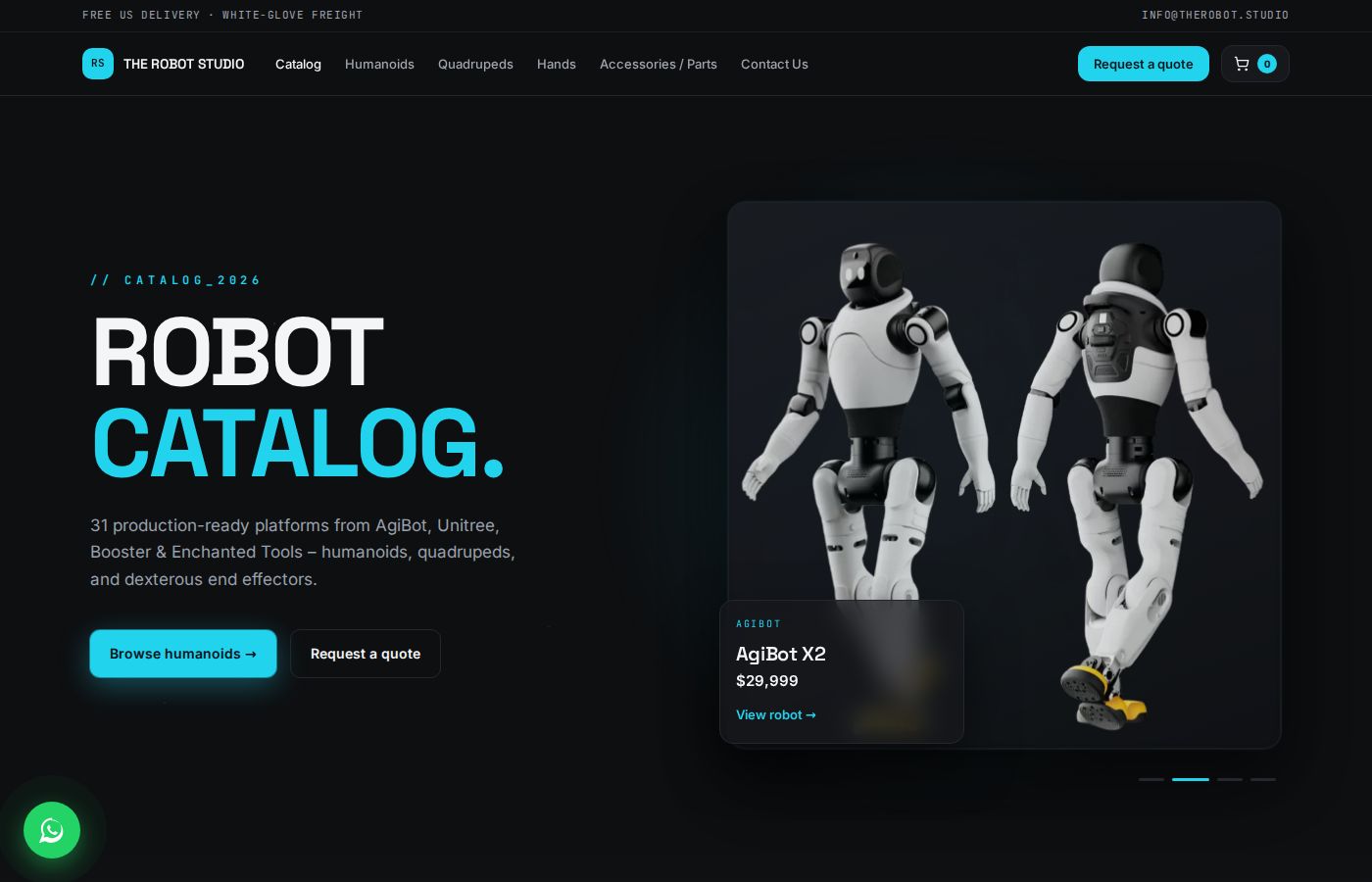
Robots are sold either by direct Stripe purchase or by quote request. The shop lives next to the rental company’s WordPress site, and the WordPress product pages link to it.
What I found in Lovable’s initial build, and what I did
| Problem | Fix | Status |
|---|---|---|
| Canonical, og and JSON-LD pointed to a lovable.app domain | Replaced with the real domain site-wide | Live |
| Doubled and broken image URLs in JSON-LD | Fixed at the source, not with an override | Live |
| No sitemap, robots or feed | All three built as dynamic routes from the products table: 46 URLs in the sitemap, robots with disallow for admin, cart and thank-you pages | Live |
| SPA with no page_view on internal navigation | page_view on every route change with a double-fire guard, page_path stripped of query strings | Live |
| Cart, account and admin getting indexed | robots noindex, follow + simple titles | Live |
| Image alt text with a duplicated-slug bug | One alt template for every gallery; live audit: 15 images, 0 missing alt | Live |
| Generic titles and meta descriptions | Unique title and description for home, categories and the quote page; template for product pages | Live |
| No Search Console at all | Property created, auto-verified via GTM, sitemap submitted | Live |
Results to date (September 2026)
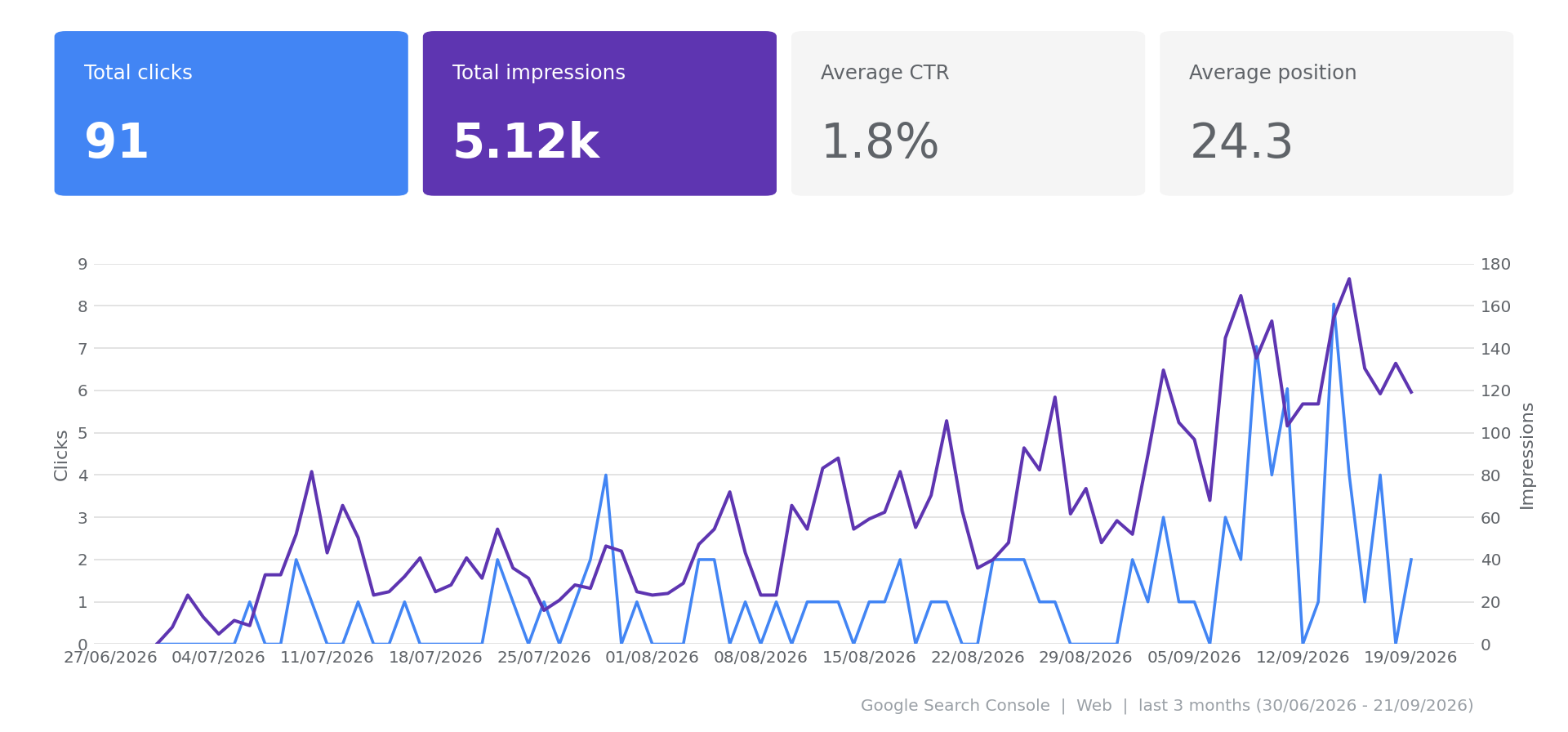
- Organic: 5,120 impressions and 91 clicks in 3 months, from zero. Last 28 days: 2,910 impressions, 58 clicks, average position 17.2 (vs. 24.3 for the full period). 35 pages indexed out of 47, the rest excluded on purpose.
- Merchant Center: 27 products approved, 0 disapproved, 0 limited, 0 pending. Store quality: Good.
- Shopping: 6.3K clicks in 28 days, up 327%.
- Leads: quote requests from universities and production companies for $40K robots.
- Measurement: a separate “Request a Quote” conversion in Google Ads, so Shopping is measured on leads and not only on clicks.
Project 2: medical supplies for institutional buyers
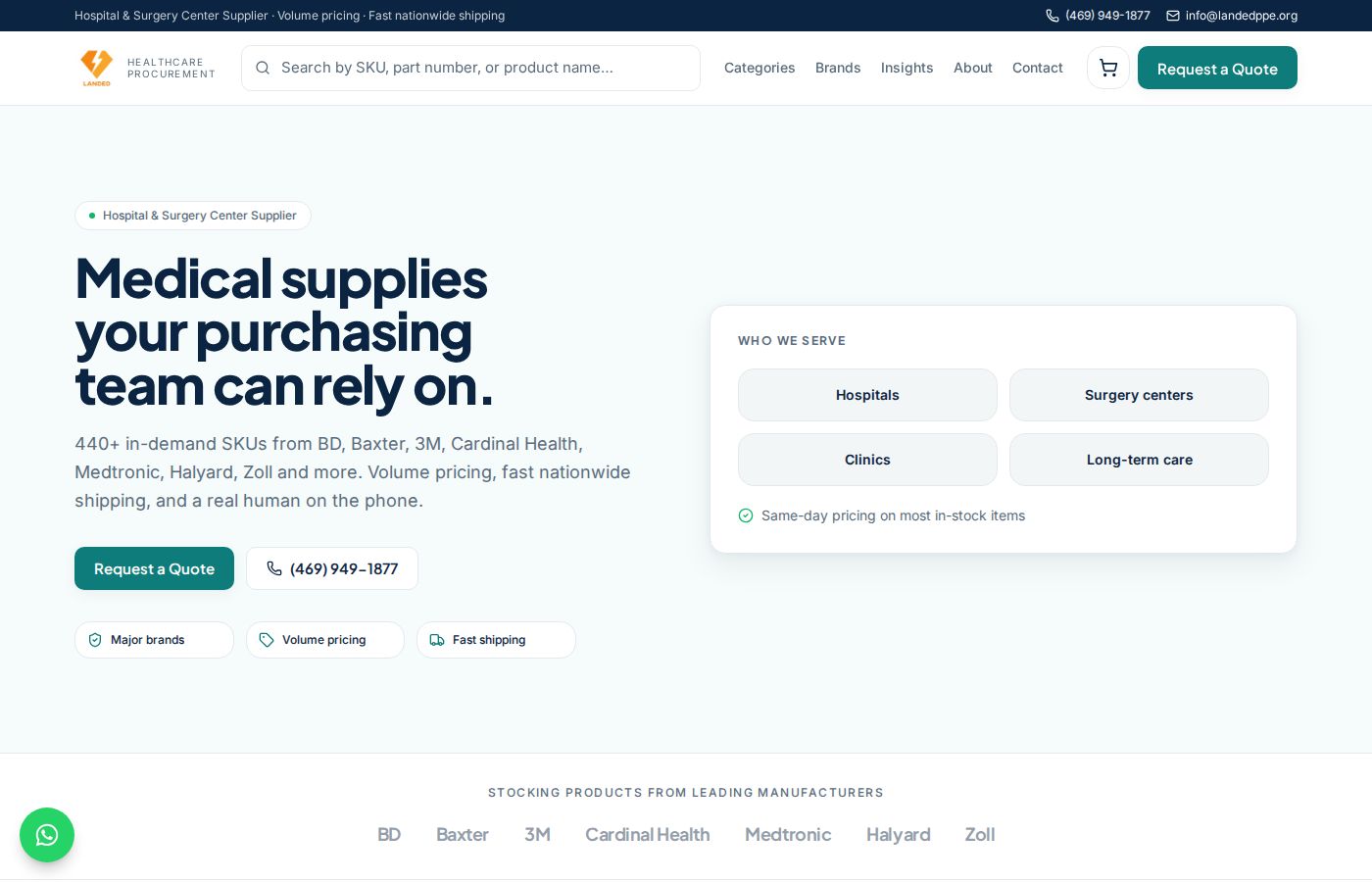
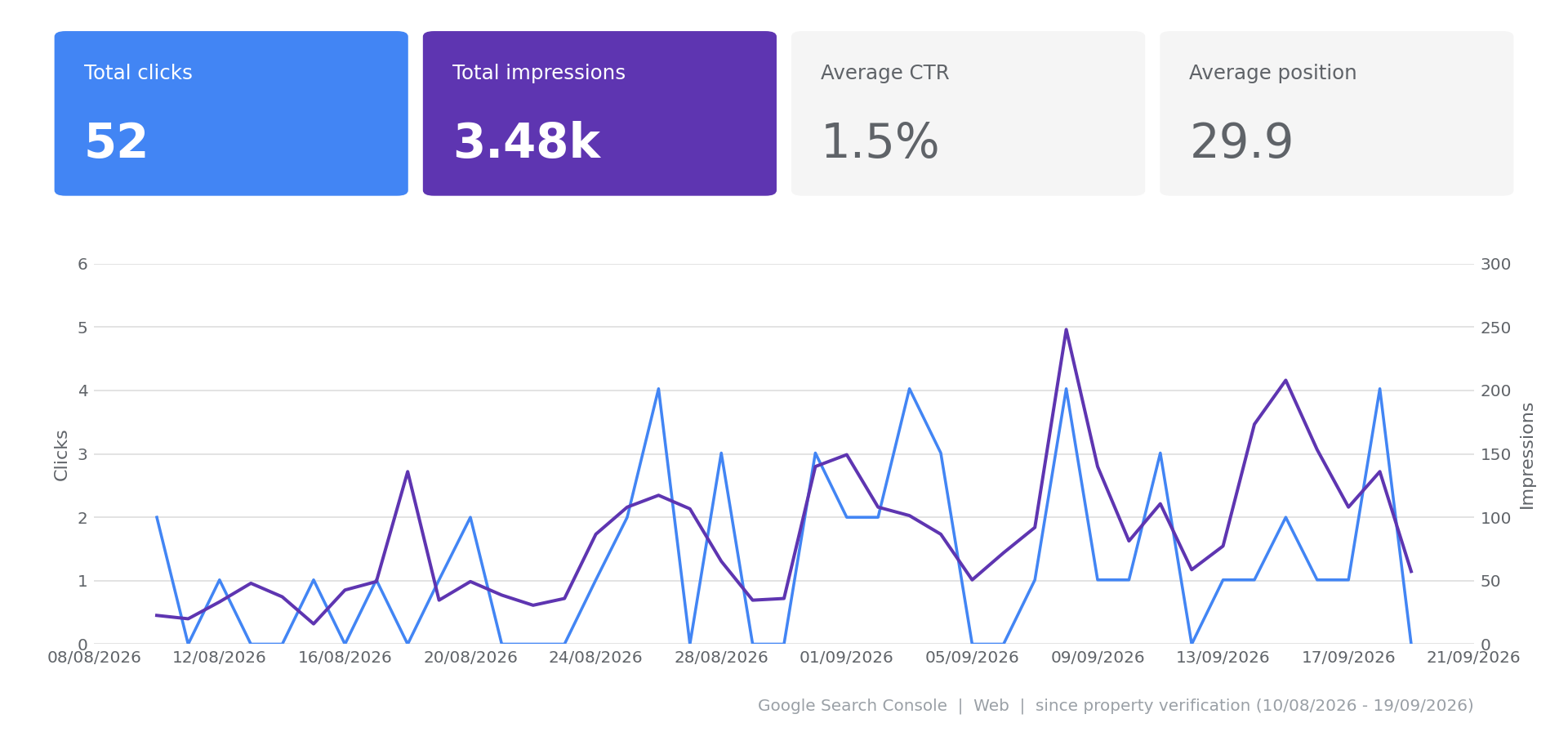
Here the challenge was not individual product pages but a catalog at scale and compliance with Google Merchant policy in a regulated category. Things that on WordPress would have required plugins or custom development:
| Capability | What was built in Lovable | Why it matters for SEO/Shopping |
|---|---|---|
| Supplier import | Admin import tool: list parsing, price-unit inference, duplicate detection, a ±35% price band for manual approval | The catalog updates without creating duplicate pages |
| Regulatory filtering | A regulatory_class column in the table; 38 Rx products kept out of the feed by data, not a hardcoded list | Prevents a Merchant account suspension |
| Per-product Ads switch | ads_enabled in the table, the feed emits excluded_destination, bulk actions in admin | Control over what gets budget without hiding products from the site |
| Shopping feed | 206 clean items, only products with a real image | Shopping campaign live |
| Quote request | A button that opens a modal, not an inline form | The inline form pushed the product grid 800px down the page |
| Offline conversions | gclid captured on the quote request, uploaded to Ads in two stages (qualified lead + closed deal) | The sale closes offline, otherwise Google never learns what worked |
Two things I learned here and not on the robots
- GTM on a Lovable site: the site pushes events gtag-style (dataLayer.push(arguments)), so GTM only sees parameters under eventModel.* and not as regular dataLayer variables. Until I fixed the variables, the conversions looked configured but were sent empty.
- Regulatory filtering has to be data in the DB, not a list in code. A hardcoded list breaks on the next import, and one Rx product in the feed is enough to get a Merchant account suspended.
Results to date: a clean feed of 206 products with an active Shopping campaign, 392 pages indexed and 3,480 organic impressions in six weeks, quote requests from hospital suppliers and clinics, and a catalog the client updates himself from a supplier list with no developer. Average position 29.9, as expected for a catalog that has not built authority yet.
The checklist: how to build a Lovable site that Google actually ranks
- Custom domain from day one, and a check that canonical, og:url and JSON-LD point to it and not to *.lovable.app.
- Friendly URLs: /products/{slug}, /category/{slug}. The slug is unique at the DB level.
- Unique title and meta description for every page, with a site-wide fallback and a template for product pages.
- JSON-LD: Organization + FAQPage site-wide, Product + BreadcrumbList on product pages. Offer availability must match the feed.
- sitemap.xml and robots.txt as dynamic routes from the DB, not static files. Non-public rows stay out.
- noindex, follow on /cart, /account, /admin, checkout return and thank-you pages.
- A designed 404 page inside the site shell, with noindex. Lovable ships a naked 404 by default.
- One alt-text template for all product images, derived from product name and brand.
- A Merchant feed (RSS 2.0) with only products that have a real image, with google_product_category, brand, mpn, and shipping and return policies identical to what the checkout says. Legal pages follow the checkout, not the other way round.
- GA4: page_view on every route change through one mechanism only, a gtag that pushes arguments and not an array, and verification through the collect request in the Network tab. If Search Console shows clicks and GA4 shows zero, the tag is broken.
- Search Console from day one. Verification through GTM works with no DNS.
- Lead and order emails server-side, once per row, recording which sender actually delivered. A verified domain in Resend is a launch requirement, not an improvement.
Working rules with Lovable that saved me the most time
- One prompt per concern, with an explicit “do not touch X” on what already works. Lovable regressions cluster in adjacent features.
- Demand a report of the files and routes that changed, then check them. Lovable reported front-end changes several times that the published site disproved. What makes it actually fix them: feeding back the exact values from the live DOM.
- Do not click “Try to fix all” in the security panel without reading. In one case it broke the admin panel; in another the warning was a stale scan and not a real problem.
- Nothing is live until Publish. The client assumes the preview is the site, and that is the source of most “why doesn’t this work”.
What did not work, and when I still choose WordPress
Lovable does not save SEO work, it moves it from plugins to prompts and verification. These are the places where it cost money or time:
When I still choose WordPress
- A content-heavy site that a non-technical marketing team updates daily. Lovable has no content editor for the client.
- A client who needs the plugin ecosystem: memberships, loyalty clubs, ready-made integrations with a local ERP.
- A client who will not pay for ongoing verification. A Lovable site with nobody checking the published site after every change will quietly fall apart.
Bottom line
You can build an ecommerce site on Lovable that behaves toward Google exactly like a professional WordPress site, and change it in hours instead of days. The condition is that someone who understands SEO and measurement drives Lovable, not the other way round.
- A design change or a new feature (abandoned-cart emails, admin panel, import tool, a new Google Ads conversion) is closed the same day, including publish and verification.
- No plugin dependency: feed, sitemap, schema and emails are the client’s own code, not a license that expires or an update that breaks the site.
- SEO and measurement are built into the product from day one, not bolted on after the site is already live.
Want an AI-built site that brings you leads?
I build SEO-first Lovable sites with a Merchant feed, verified tracking, emails and an admin panel the client actually uses. Already have a site? I will review its feed, tracking and SEO in 20 minutes, no strings attached.